Search
Search finds text inside pages, tasks and code. To jump to a page, task or file by its name, use Ctrl+K instead.
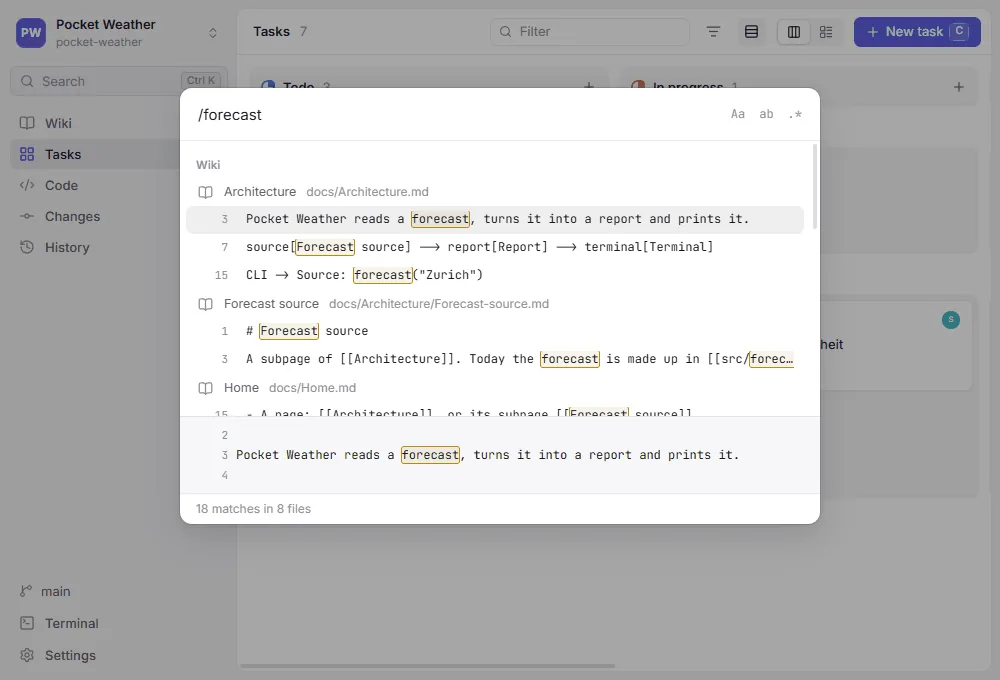
Starting a search
Section titled “Starting a search”- Press
Ctrl+Shift+F, or - press
Ctrl+Kand type/before the text, or - choose Search in files… in the
Ctrl+Kpalette.
Results appear as soon as you pause typing.
What you type
Section titled “What you type”/flux capacitor finds the text flux capacitor as written, ignoring case; spaces and characters such as ., * or - count literally. Three switches next to the field change that (on macOS, the keys are ⌥⌘ and the letter):
| Switch | Keys | Effect |
|---|---|---|
Aa | Alt+C | Match case |
ab | Alt+W | Whole words only: log does not find login |
.* | Alt+R | Regular expression, Perl-compatible: colou?r, `TODO |
Regular expressions are read by Git’s PCRE support, which Git for Windows and most Linux distributions have; where Git lacks it, they are POSIX extended expressions (git grep -E), without \d, \w or \b. An invalid expression says what is wrong with it, and one that would take too long to match, such as (a+)+b, asks for something more specific.
Results
Section titled “Results”Matches are grouped into Wiki, Tasks and Code. Each file is listed once, with its matching lines below it and the match highlighted; the lines around the selected match show at the bottom. ↑ and ↓ move, Enter opens:
- a page scrolls to the section the line is in,
- a task opens in its panel,
- a file opens in the editor with the line selected.
The status line counts the matches. Search lists up to 30 files per group and 10 lines per file, and shortens long lines around the match; when it left something out, the status line says more not shown, and a more specific search finds the rest.
What is searched
Section titled “What is searched”- Files Git tracks, and new files not committed yet, such as a page created a moment ago.
- Not files that
.gitignoreexcludes, and not binary files such as images. - Pages, tasks, task templates, other text files in the wiki folder and
.genbeya.ymlcome from wherever their area lives, the checkout or the Content branch, and code from your checkout; the copy an area on the content branch left in the checkout is not listed as well.
Search runs git grep on the machine the repository lives on, so it works the same for repositories on WSL and over SSH.